Give AI a better brief.
Judge the finished work.
A smarter AI can't make up for facts you never gave it, or turn a vague goal into one you can measure. That part is your job, and it's what a good brief does. It says what you want, what the AI needs to know and how you'll judge the result. Then choose the model and how you work with it on purpose, and check the result against evidence, not how confident it sounds.
- Specific briefs
- Deliberate model choice
- Cost per accepted result
In this guide
Use enough AI to do the job well.
Match the model to the job, check the result, and pay for the strongest models only where they earn it.
Today, the top models do the hard work. Advanced tasks, such as designing and testing a business app or building an interactive 3D world, currently need the most capable models, such as Astra and Opus. Mid-tier models handle routine building well and cost less. This will change. As newer mid and lower tier models improve, jobs that need the top tier today will move down, so treat the routes below as a snapshot, not a rule.
Chat is usually the cheapest way to work. It often doesn't use up credits, unlike Work or Cowork-style modes. That varies by vendor and plan and can change, so check yours before a long job. And the app may prompt you to move to those credit using modes, but often you do not need to.
Choose your vendor and task below to see a suggested route.
Find the right AI model for the job
Your brief matters more than the model. Choose an AI vendor, then your task, to see which model suits each step and why.
Start on the left
- 1Choose your AI vendorThe company behind the model you use.
- 2Choose your taskWhat you want to get done.
You will then see which model to use at each step, why, and what to check yourself.
Text guide if the explorer does not load
Reusable web controls: the everyday model builds one control from your design specification, then you test it on a staging copy. Web pages: the most capable model plans, the everyday model builds from your controls, then you test on a staging copy. Business apps: the most capable model writes the design and tests the result against it, the everyday model builds in stages. Documents, decks and workbooks: the everyday model throughout, then you check the file. Research: the most capable model tests the options, then you check the key sources. Small edits: the cheapest model first, then you check the facts. Animations and 3D worlds: the most capable model throughout.
Start cheaper. Move up when the result falls short.
For a clear, bounded task, try the lower-cost model first. Check it against a real example. If a focused correction still misses the mark, move up with the brief and failure evidence—not another vague request to “make it better”.
Over time, keep a short record of task → model → result → rework. You will learn which models are good at your work. Start stronger when architecture, complex animation or interacting systems make a poor first attempt expensive to unwind.
Different names. A similar decision.
Read across to find the family names. These are useful starting points, not equivalent capability guarantees. The OpenAI column also has approximate credit usage. It's a good reminder the relative cost difference between models is significant.
| Start here for… | OpenAI | Anthropic | Grok | |
|---|---|---|---|---|
| Focused, clear tasksLower-cost starting point | Luna~1× credit rate | Haiku | Flash-Lite | GrokLower effort |
| Everyday developmentBalanced capability | Sol~20× credit rate | Sonnet | Flash | GrokMedium effort |
| Difficult reasoningHigher-cost starting point | Astra~100× credit rate | OpusFable for premium escalation | Argon | GrokHigh / xhigh effort |
Relative usage rate—not total task cost. OpenAI figures use the current Standard credit rate card; each vendor has its own charging system.
What the cost indicators mean
The OpenAI ratios compare equal volumes of uncached input and output against Luna, using the current releases at the review date. They do not predict how much reasoning a task needs, the cost of retries or your included subscription allowance. Cached input, speed and older releases can change the ratio. Check the current rate card.
The other vendor columns show family positioning, not OpenAI credit equivalents. Grok changes effort within one family: more reasoning can use more tokens without changing its base token rate.
Model family and reasoning effort are separate choices. Start with the default effort; increase it for a demonstrated reasoning problem. “High” is not a standard measure across vendors.
Newer releases of the same family can be cheaper at comparable effort. Do not assume an older release saves money; check its rate and whether it finishes the task reliably.
Choose the tools the task needs.
Vendors name and package these differently (Work, Cowork, Codex and others), and they change often. In general, one mode is a conversation and the other is set up to do more of the handling. Our experience covers some tools, not all, so check yours.
CHAT: more capable than it looks, and often cheaper. Chat can do far more than answer questions. In some tools you can upload several files, get a complete code pack back as a zip, have tests run on code and create full Word, PowerPoint and Excel files. Ordinary conversation is usually covered by your plan, within limits, so it can be the more cost-effective way to work and code simpler projects.
WORK: smoother integration. Some models Work mode can be set up to do more of the handling for you, such as working with your files and connected tools in place, with fewer manual steps in between. The main gain is smoother integration. Some models are also only offered in Work, Astra being one example, so reaching the most capable model can mean switching modes. Work modes draw on credits or a separate allowance, so check before a long job.
WHEN SWITCHING HELPS, AND WHEN IT DOESN'T Switching tends to help when the model you need is only offered in Work, when a job depends on tight integration with your files or other tools, or when repeated changes across a project make moving files in and out tedious. It rarely helps if Chat is already giving you what you need, and it costs more. Don't switch because a task feels important. If you do, bring your design specification, current files and master prompt, so the new mode starts with the full picture.
IF YOUR TOOL LIMITS YOUR FILES Some tools restrict which file types you can upload, and how many files at once. Put the files in a zip file, change the extension from .zip to .txt, upload it and tell the AI it is a zip file. It can then work with file types and file counts the tool would not normally accept. It works for us in Copilot. We haven't tested every tool, so try it on yours before you rely on it. Check your organisation's policy first, and never upload customer or staff data to a tool that hasn't been approved.
Reviewed 16 October 2026. OpenAI & CoPilot (with OpenAI & Claude models) reflect KJM’s experience; the other vendors are suggested routes to trial. Availability depends on your app, plan and organisation.
OpenAI model families · Claude model families · Gemini model families · Grok models and pricing · ChatGPT Work / Codex usage and pricing
Bring the judgement. Let AI bring the breadth.
Think of AI as a brilliant graduate joining your team. It has absorbed an extraordinary amount of current thinking, methods and technical knowledge, and can work across areas you may never have had reason to learn yourself. What it doesn't have is years of experience inside your organisation, an understanding of why past decisions were made, or accountability for what happens next.
That's the partnership. You bring the context, judgement and experience. AI brings the breadth, speed and techniques to turn that knowledge into something useful.
A vague instruction such as "make this professional" wastes both. Tell AI who the work is for, what they need to decide, the evidence it should use, the constraints it must respect and what good looks like. Then challenge the result rather than simply accepting it.
A brief that prevents a generic first pass
What I need: a guide a business owner can use to decide whether an enquiry process needs a new app, an automation or a change to the system they already have.
Who it is for: a capable manager who understands the business but doesn't write software.
What to base it on: the attached process description and examples. Say which points come from our real experience and which are illustrations. If the material doesn't support a point, say so. Don't invent results, quotes or savings.
What it must respect: use the Microsoft tools we already have where they fit. Keep business records off the public website. Try changing settings before building anything custom.
What good looks like: one worked decision, the trade-off, one example of failure and a reusable checklist. Every section should contain something specific to our situation rather than generic advice that could apply to anyone.
An example to follow, if available: use the attached example to understand the depth, structure and standard required. Follow the principles rather than copying the wording.
What to hand back: an editable guide with clear sections and links to the evidence. Flag anything that remains unresolved.
Don't have all of this ready? Ask AI to interview you one group of questions at a time and build the brief from your answers.
Give it the real material
AI has broad knowledge, but it doesn't know your organisation unless you give it the context. Attach the relevant files, examples, decisions and history. Tell it when your supplied evidence takes precedence over general knowledge, and tell it to say when something isn't supported rather than filling the gap.
Show it what good looks like
A real example is often more useful than another paragraph of instructions. Show AI something that represents the standard you want and explain what makes it good. Be clear about what to follow, such as structure or depth, and what not to copy.
Work in sections
For substantial work, take one section at a time. Review it, challenge it and explain why something is wrong before moving on. This keeps you in control and gives AI useful feedback.
If the result is generic, don't ask for "more detail". Ask for greater specificity:
"For each recommendation, tell me what you recommend, why, what evidence supports it and what should happen next."
The goal isn't a longer answer. It's about getting it right.
Separate what matters from how to achieve it
Be firm about the outcome, business rules, security, access and other constraints. Be less prescriptive about implementation where you don't need to be. This gives AI room to bring techniques or approaches you may not have considered, without letting it negotiate away the things that matter.
Rebuild the master prompt from what actually worked
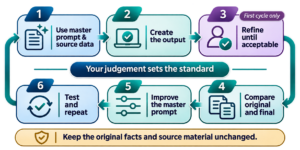
Treat the master prompt as something you improve
Create the master prompt or agent instruction from the start. Use it to produce the first result, then refine the output to an acceptable standard, then the prompt until the output reliably meets your standard. Multiple versions of the prompt before you get there is perfectly reasonable.
One rule matters: keep the facts and source material constant while you improve the prompt. Otherwise, you can't tell whether the prompt got better or you simply gave AI better information. If important information was genuinely missing, add it, reset the baseline and start the comparison again.
1. Use master prompt & source data. Run the current version of the master prompt using the same source data. Keep both unchanged throughout the improvement cycle.
2. Create the output. Save the output exactly as produced. This is the version you will compare with your accepted benchmark.
3. Refine until acceptable. First cycle only. Work on the first output until you consider it acceptable. This becomes the benchmark output. Don't introduce new facts or source material while refining it. Otherwise, you are changing the inputs rather than improving the prompt.
4. Compare original and final
Give AI:
- The current master prompt and original source data
- The output it just produced
- The benchmark output from Step 3
Ask:
"Compare this output with the benchmark. Using only the information available in the master prompt and original source data, identify which instructions are missing, weak or ambiguous and would make the output more reliably meet the benchmark."
Separate the findings into:
- Standing rules that should always apply
- Questions needed as the answer changes each time
- One-off differences that should not become permanent rules
5. Improve the master prompt. Create the next numbered version using the reusable lessons from Step 4. Change only what the comparison shows needs improving.
6. Test and repeat. Run the new master prompt against the same original source data and compare the new output with the same accepted benchmark.
Repeat Steps 1, 2, 4, 5 and 6 until the output reliably reaches the benchmark without manual refinement.
Keep the original facts and source material unchanged during development. If essential information was missing, update the inputs and establish a new benchmark.

Continue with the next decision
Use the related guide that addresses the next constraint in your work.